Klik disini untuk sukses

Search

Translate

Kumpulan Serial Number Windows XP, Vista, 7

0

Selamat datang kembali di blog ini, sudah sekian hari saya tidak bisa update blog ini karena ada kesibukan. Dan sekarang saya ingin berbagi sedikit "sesuatu" yang saya ketahui untuk anda semua.

Menurut saya, anda pasti membutuhkan jika anda adalah orang yang seperti saya. Adalah sesuai judul postingan ini yaitu Kumpulan Serial Number Windows XP, Vista dan Windows 7. Nah... anda pasti sudah ada yang serius begitu membaca serial number..

Saya sendiri tidak ada komentar banyak tentang serial ini, yang pasti tak ada salahnya jika anda mencobanya. Bagaimana cara memasukan serial number tidak akan saya bahas di sini, karena anda sekalian pasti sudah mahir.

Jika anda ingin membuktikannya, silahkan instal salah satu OS diatas (win xp, vista, atau win 7). Kemudian saat meminta kode aktivasi, silahkan abaikan bawaan CD Bajakan tersebut dan ganti dengan yang ada di postingan ini. Jika di terima kodenya teruskan istal hingga tuntas.

Silahkan download serial numbernya di bawah ini. buruan sebelum di hapus!!

Download:
http://www.ziddu.com/download/15091262/SNwindowsXP.txt.html
»»  read more

Internet Download Manager 6.05 Build 14 Final

0
Internet Download Manager has a smart download logic accelerator that features intelligent dynamic file segmentation and safe multipart downloading technology to accelerate your downloads. Unlike other download accelerators and managers that segment files before downloading starts, Internet Download Manager segments downloaded files dynamically during download process. Internet Download Manager reuses available connections without additional connect and login stages to achieve better acceleration performance. Internet Download Manager supports proxy servers, ftp and http protocols, firewalls, redirects, cookies, authorization, MP3 audio and MPEG video content processing. IDM integrates seamlessly into Microsoft Internet Explorer, Netscape, MSN Explorer, AOL, Opera, Mozilla, Mozilla Firefox, Mozilla Firebird, Avant Browser, MyIE2, and all other popular browsers to automatically handle your downloads. You can also drag and drop files, or use Internet Download Manager from command line. Internet Download Manager can dial your modem at the set time, download the files you want, then hang up or even shut down your computer when it's done.
Description:
Main Features:
• All popular browsers and applications are supported! Internet Download Manager has been tested with the following browsers: Internet Explorer, MSN Explorer, AOL, Netscape Communicator, Netscape 6, Netscape 7, Mozilla, Mozilla Firefox, Mozilla Firebird, Opera, NetCaptor, UltraBrowser, Slim Browser, Avant Browser, MyIE2, Optimal Desktop, Ace Explorer, Advanced Browser, 27 Tools-in-1 Wichio Browser, WindowSurfer, 550 Access Browser, FineBrowser Freeware, Kopassa Browser, Fast Browser Pro, Enigma Browser, GoSuRF, K-Meleon, Smart Explorer, The Off By One Web Browser, Smartalec Voyager, CrystalPort AppCapture, The Family Browser, XANA Web Browser, Bluto, AutoSurf, 32bit Web Browser, BrowseMan, WrestlingBrowser, Eminem Browser, UltraBrowser, Cygsoft LDAP Browser, and Net M@nager. Internet Download Manager supports all versions of popular browsers, and can be integrated into any 3rd party Internet applications.
• Easy downloading with one click. When you click on a download link in a browser, IDM will take over the download and accelerate it. IDM supports HTTP, FTP, HTTPS and MMS protocols.
• Download Speed Acceleration. Internet Download Manager can accelerate downloads by up to 5 times due to its intelligent dynamic file segmentation technology. Unlike other download managers and accelerators Internet Download Manager segments downloaded files dynamically during download process and reuses available connections without additional connect and login stages to achieve best acceleration performance.
• Download Resume. Internet Download Manager will resume unfinished download from the place where they left off.
• YouTube grabber. Internet Download Manager can grab FLV videos from popular sites like YouTube, MySpaceTV, and Google Video.
• Simple installation wizard. Quick and easy installation program will make necessary settings for you, and check your connection at the end to ensure trouble free installation of Internet Download Manager
• Drag and Drop. You may simply drag and drop links to IDM, and drag and drop downloaded files out of Internet Download Manager.
• Automatic Antivirus checking. Antivirus checking makes your downloads free from viruses and trojans.
• Advanced Browser Integration. When enabled, the feature can be used to catch any download from any application. None of download managers have this feature.
• Built-in Scheduler. Internet Download Manager can connect to the Internet at a set time, download the files you want, disconnect, or shut down your computer when it's done.
• IDM includes web site spider and grabber. IDM downloads all required files that are specified with filters from web sites, for example all pictures from a web site, or subsets of web sites, or complete web sites for offline browsing. It's possible to schedule multiple grabber projects to run them once at a specified time, stop them at a specified time, or run periodically to synchronize changes.
• IDM supports many types of proxy servers. For example, IDM works with Microsoft ISA, and FTP proxy servers.
• IDM supports main authentication protocols: Basic, Negotiate, NTLM, and Keberos. Thus IDM can access many Internet and proxy servers using login name and password.
• Download All feature. IDM can add all downloads linked to the current page. It's easy to download multiple files with this feature.
• Customizable Interface. You may choose the order, and what buttons and columns appear on the main IDM window.
• Download Categories. Internet Download Manager can be used to organize downloads automatically using defined download categories.
• Quick Update Feature. Quick update may check for new versions of IDM and update IDM once per week.
• Download limits. Progressive downloading with quotas feature. The feature is useful for connections that use some kind of fair access policy (or FAP) like Direcway, Direct PC, Hughes, etc.
• IDM is multilingual. IDM is translated to Albanian, Arabic, Azerbaijan, Bosnian, Bulgarian, Chinese, Croatian, Czech, Danish, Dutch, Farsi, French, German, Greek, Hebrew, Hungarian, Italian, Japanese, Korean, Lithuanian, Macedonian, Norwegian, Polish, Portuguese, Romanian, Russian, Serbian, Slovak, Slovenian, Spanish, Thai, Turkish, and Uzbek languages.

What's New in This Release:

* Improved recognition of audio and video streams in web players
* Improved download resuming when a download link has expired
* Improved processing of https protocol
* Fixed bugs

Homepage - http://www.internetdownloadmanager.com/

Download:
http://www.filesonic.com/file/974540554/Internet%20Download%20Manager%206.05%20Build%2014%20Final.rar
»»  read more

Kaspersky Internet Security 2012 v12.0.0.374 & Kaspersky Anti-Virus 2012 Beta v12.0.0.374

0
Kaspersky 2012 products for home and home office are specifically designed to provide hassle-free and quality protection against viruses, worms and other malicious programs, as well as hacker attacks, spam and spyware.

Kaspersky Internet Security 2012
Kaspersky Internet Security 2012 has everything that you need to stay safe and secure while you're surfing the web. It provides constant protection for you and your family – whether you work, bank, shop or play online. Stay ahead of the threats with Kaspersky Internet Security 2012!

Key Features and Benefits
Kaspersky Internet Security 2012 stops your PC or Netbook being slowed down by cybercriminals and delivers unsurpassed on-line safety whilst protecting your files, music and photos from hackers:

* Real-time proactive protection against all Internet threats Improved!
Prevents all types of known and unknown malware from infecting your computer.
* New Safe Surf feature for unparalleled online security New!
With Safe Surf you’ll never be exposed to harmful or offensive websites. Regular database updates from Kaspersky Lab means that Safe Surf will automatically block undesirable websites as they appear. Just switch it on.
* Protection for your digital identity at all times Improved!
Smart anti-phishing protection and Virtual Keyboard keep your digital identity absolutely secure when you are shopping, banking or social networking online.
* Feature-rich and effective Parental Control Improved!
The product’s advanced Parental Control features can block, limit and log applications and web access, so your children stay safe online.
* Application Control prevents dangerous software from harming your system Improved!
Each program is granted rights and access to system resources based on an automated risk-assessment using Kaspersky Lab’s in-the-cloud security database.
* System Watcher technology New!
Cutting-edge System Watcher technology monitors and analyzes every system event to accurately detect any dangerous behavior. If a threat occurs, the user will be prompted to roll back any malicious program activity.
* Unique Safe Run mode for apps & websites Improved!
Safe Run mode lets you run suspicious applications and websites in a specially isolated environment where they cannot damage your system.
* Special tools to treat even the most complex infections Improved!
The installation CD can also be used as a bootable rescue disk to help you to restore your system should you ever need to. If you’ve downloaded your Kaspersky Lab product you can create your own Rescue CD using the program.
* Easy-Access Desktop gadget New!
Checking your PC’s protection status and quickly accessing your preferred security features and settings has never been easier!

New and Improved Features:
Kaspersky Internet Security 2012 offers a number of new and improved features together with unique protection technologies to address the latest online threats, keep your PC or Netbook running smoothly and customize protection according to your activities:

* Improved: Risk-based Application Control restricts programs’ rights to access potentially vulnerable system resources or share sensitive data on the Internet
* New: System Watcher - Heuristics-based analysis monitors, restricts and blocks suspicious program behavior
* Improved: Safe Run mode launches questionable applications and websites without risk
* Improved: Rescue CD disinfects the system after malware attacks
* New: Safe Run for websites mode provides added security for online banking and other similar activities where a high risk of identity theft exists
* Improved: Advanced antimalware technologies even allows installation on infected PCs
* New: New System Watcher technology tracks, records and analyzes suspicious activity and lets you roll back any dangerous actions
* New: Safe Surf technology blocks malware and phishing websites for great online security

Key Protection Technologies
Kaspersky Internet Security 2012 has a range of unique technologies for heightened security and protection for your family. Keeps your PC or Netbook healthy:
* Real-time proactive protection against viruses and other malware Improved!
* Safe Surf and Kaspersky Web Toolbar for online security New!
* Best-in-class personal firewall for keeping hackers at bay
* Identity protection with Virtual Keyboard and anti-phishing Improved!
* Unique Safe Run mode for suspicious app’s & sites Improved!
* Advanced Parental Control with flexible settings Improved!
* Smart anti-spam and anti-banner protection Improved!
* Computer tune-up for better performance and protection
* Rescue CD for system restoration after malware attacks Improved!
* Automatic scheduled scans and updates

Protection from all types of malware
Award-winning technologies in Kaspersky Internet Security 2012 protect you from a wide range of IT threats:
* Viruses, Trojans, worms and other malware, spyware and adware
* Rootkits, bootkits and other complex threats
* Identity theft by key loggers and screen capture malware
* Botnets and various illegal methods of hijacking your PC
* Zero-day attacks and unknown threats
* Drive-by download infections

Kaspersky Anti-Virus 2012
Kaspersky Anti-Virus 2012 – the backbone of your PC’s security system, offering real-time automated protection from a range of IT threats. Kaspersky Anti-Virus 2012 provides the basic tools needed to protect your PC. Our award-winning technologies work silently in the background while you enjoy your digital life.

Key Features and Benefits
Kaspersky Anti-Virus 2012 – the backbone of your PC’s security system, offering real-time automated protection from a range of IT threats:
* Real-time protection against viruses and spyware Improved!
* Scanning of websites and emails for malicious code Improved!
* Protection for your digital identity at all times Improved!
* Vulnerability scan and treatment advice
* Easy-access Desktop gadget New!

New and Improved Features
Kaspersky Anti-Virus 2012 offers a number of new and improved features together with unique protection technologies to address the latest online threats, keeping your PC running smoothly and customize protection according to your activities:
* Improved: Rescue CD disinfects the system after malware attacks
* Improved: Advanced antimalware technologies even allows installation on infected PCs
* Heuristics-based analysis monitors, restricts and blocks suspicious program behavior
* New: Easy-access Desktop gadget for quick access to program features and settings whenever you need them

Key Protection Technologies
Kaspersky Anti-Virus 2012 has a range of unique technologies which heighten security and keep your computer protected and running smoothly:
* Real-time proactive protection against viruses and other malware Improved!
* Scanning of OS and apps for vulnerabilities
* Computer tune-up for better performance and protection
* Rescue CD for system restoration after malware attacks Improved!
* Automatic scheduled scans and updates

Protection from all types of malware
Award-winning technologies in Kaspersky Anti-Virus 2012 protect you from a wide range of IT threats:
* Viruses, Trojans, worms and other malware, spyware and adware
* Rootkits, bootkits and other complex threats
* Identity theft by key loggers
* Botnets and various illegal methods of hijacking your PC
* Zero-day attacks and unknown threats
* Drive-by download infections
Download:
http://www.enterupload.com/z1w7mfx08p2w/KIS12.KAV12.part1.rar.html
http://www.enterupload.com/racw167hjzco/KIS12.KAV12.part2.rar.html
or download here:
http://uploadstore.net/ixueyawad2re/KIS12.KAV12.part1.rar.html
http://uploadstore.net/v9rk0g0z2ork/KIS12.KAV12.part2.rar.html
»»  read more

Nokia terbaru N series

0

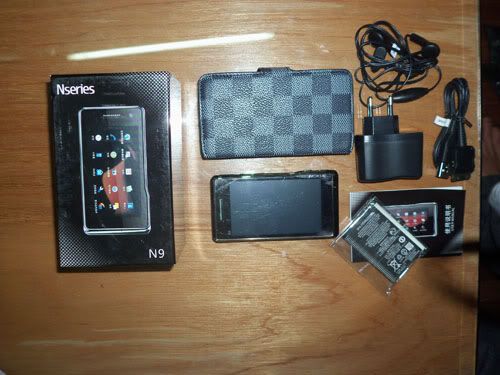
Kabarnya Nokia telah meluncurkan Produk terbarunya pada Nseries yaitu Nokia N9. Pada seri ini nokia meninggalkan OS andalannya symbian. Kabarnya Nokia memakai OS Meego untuk menyaingi produk lain yang lebih dulu beredar dan bermunculan di pasaran. Apasih Meego itu? meego adalah os berbasis kernel linux, dikembangkan dari maemo selain itu Nokia N9 hadir dengan keyboard QWERTY geser. Cassing dari Nokia N9 tersebut nampaknya menggunakan konstruksi berbahan aluminium sehingga terlihat kokoh di genggaman.

Tapi sayang N9 alias si Meego sampai saat ini belum hadir di Indonesia. Kita sama-sama tunggu kapan hadir di negeri ini. Tapi saya sekarang telah memilikinya, makanya saya agak sedikit pamer kepada anda semua. (bercanda lho)

Bagi anda yang ingin memiliki Nokia N9 seperti punya saya, lebih baik telp ke 021-99763457 atau ke 08153890457 nanti akan saya jelaskan.

Baca info selengkapnya:
Indonesian Description:
Nokia N9 100% sama dengan aslinya best copy, Casing terbuat dari logam sama seperti aslinya
Layar sangat besar enak di pakai foto dan video
sudah ada document reader
keyboard external dan softcase gratis!
touchscreen sangat sesitive bisa menggunakan kuku atau jari bebas
Kualitas suara oke banget.

fisik 100% asli. fitur hampir sama dengan yg asli. Software java
0
Spesifikasi Nokia N9Brand / Type
Brand Nokia
Type N9
Form factor Slide sideways
Color Various
Network
Phone Network 3G, EDGE, GPRS, GSM, HSDPA (3G), HSUPA
Service 850, 900, 1700, 1800, 1900, 2100
Connectivity
Bluetooth v2.0 with A2DP
Infrared No
Wi-Fi (WLAN) No
USB YesMicroUSB v2.0
Fax / Data Yes
Display Nokia N9
Main display Super AMOLED capacitive touchscreen
Color display 16.000.000 colors
Dimensions 4 in.
Resolution 360 x 640 pixels
External display No
Memory
Internal memory 512 mb
External memory up to 8GB
Memory slots 1
Storage types MicroSD, MicroSDHC
Basic
Battery Standard battery, Li-Ion
Standby time N/A
Talk time N/A
Calling
Vibrate alert Yes
Photo ID Yes
Ringtones MP3, WAV
Camera Nokia N9
Camera Yes
Megapixels 1.0 megapixels
Maximum photo resolution 3264×2448 pixels
Digital zoom Yesx
Optical zoom No
Flash No
Recording video Yes
Second (front) camera Yes
Messaging
SMS Yes
MMS Yes
T9 text function Yes
E-mail Yes
Internet browsing Yes
Entertainment
FM radio Yes
Java Yes
Audio player eAAC, MP3, WAV, WMA
Video player DivX, H263, H264, MP4, WMV, xVID
Features Nokia N9
Add ringtones Yes
Organiser Organiser, Voice memo, Document viewer
Video call Yes
Other features Flash Lite v4.0, TV-out (720p video) & Dolby Digital Plus via HDMI, Downloadable games, Video/photo edito

INCLUDE MMC 1GB Kelengkapan : Dus

Baterai 2
HandFree
Charger
Cabel data
QWERTY Keypad / Pouch

»»  read more